
 site
site contact
 history
 index
indexEasyClone alternate build path and progress
EasyClone is introduced here:
https://easyos.org/install/how-to-clone-a-easyos-installation.html
Forum member pp4mnk suggested it would be helpful to have a progress indication while the "EASYCLONE" file is being created. Forum member oliverjames wants an alternative path in which to build "EASYCLONE", if insufficient space in the working-partition. Discussion here:
https://forum.puppylinux.com/viewtopic.php?t=16721
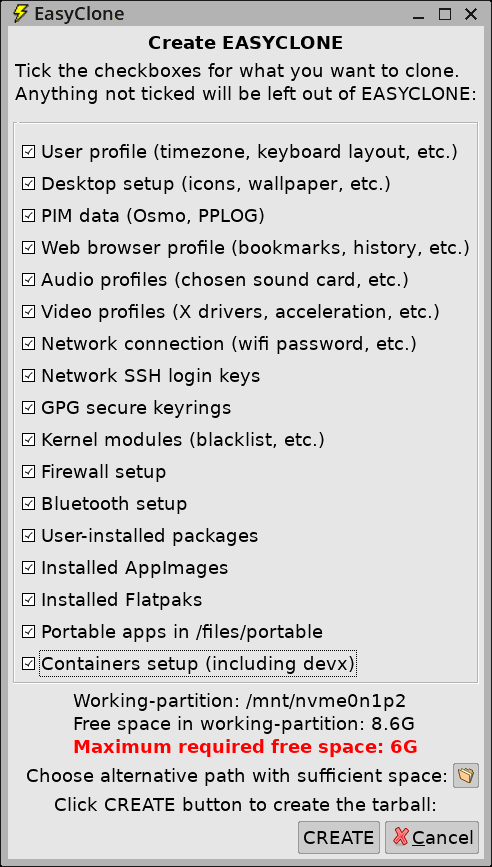
I have implemented both. There is now a button to bring up a dialog window to choose an alternative path, see near bottom:
While creating EASYCLONE, there is a window on the desktop that has lines appended as the build progresses. Here it is at about 90%:
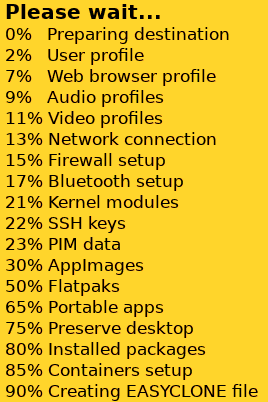
...this makes use of the 'popup' utility, which has the ability to append lines.
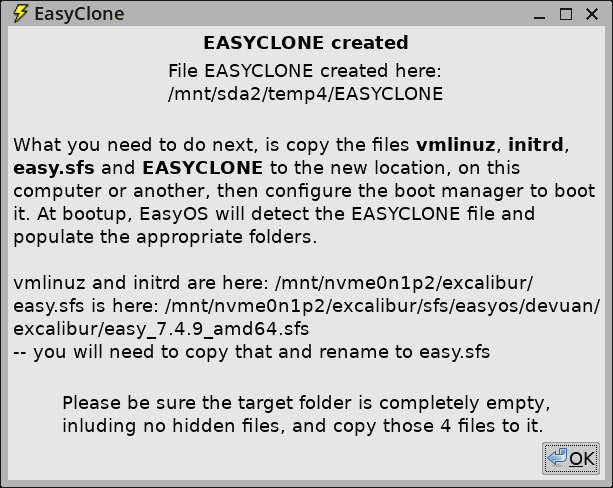
Here is the final window, showing the path, in a "temp4" folder where I chose to build EASYCLONE:
EasyClone is proving to be popular, this takes the usability up a
notch.
Tags: easy
German users please stay with version 7.4.7
There is a bad "de" translation that breaks the desktop:
https://forum.puppylinux.com/viewtopic.php?p=176948#p176948
Please wait for Easy 7.4.10
Tags: easy
Fix reading Xlibre server version
See forum:
https://forum.puppylinux.com/viewtopic.php?p=176902#p176902
A quick check, I have to fix more than just the xorgwizard:
# grep -rl 'Xorg -version' .
./usr/bin/inxi
./usr/sbin/xorgwizard-automatic
./usr/sbin/xorgwizard
./usr/local/video_upgrade/video_upgrade_wizard
Tags: easy
EasyOS Excalibur-series version 7.4.9 released
Oh wow, uploading took all day. I'm at a caravan park in rural Western Australia, that has free wifi. It is by StarLink, which is slower to upload than download. But this is incredible; started uploading the latest EasyOS, by sunset still only about halfway.
My phone contract is with Vodafone; however, Vodafone has poor coverage in rural regions. Whereas, Telstra has good rural coverage. I have a second phone with a Telstra sim, a prepaid sim, not a contract. Gave up on the wifi, did a 28-day recharge, 20GB, on the Telstra sim, AU$44, and finished the upload very fast. Telstra has 5G in this town.
Changes since 7.4.8:
- Audacious is back, more DE translations — September 16, 2026
- Fix system X cursor Chromium 151* — September 16, 2026
Download:
https://distro.ibiblio.org/easyos/amd64/releases/excalibur/2026/7.4.9/
Feedback welcome at the forum:
https://forum.puppylinux.com/viewtopic.php?p=176899#p176899
Have fun!
Tags: easy
Audacious is back, more DE translations
The Audacious music player got left out of Easy 7.4.8, now fixed.
Forum member RingeUI has been contributing German translations. That's great, have added the last contribution for the easy 7.4.9 build.
As the Chromium X cursor has been fixed, Easy 7.4.9 will be back
on building with the latest security-release of Chromium, right
now that's 152.0.7977.82.
Tags: easy
Fix system X cursor Chromium 151*
I posted that Chromium 151.* was no longer recognizing the system
cursor.
Forum member NorthernSoul found a solution, adding this line in /etc/gtk-3.0/settings.ini:
gtk-cursor-theme-name = default
Good, but it does pose a problem when update Easy from an earlier version, as that settings.ini file may have user-customizations. That means, although I have fixed it in easy.sfs, the bottom layer of overlayfs, the user-customized settings.ini will be on the top read-write layer of overlayfs.
Therefore, in the initrd, I am putting in some code to check if
there is a settings.ini on the read-write layer, and append that
extra line onto it.
Tags: easy
EasyOS Excalibure-series version 7.4.8 released
Highlights since 7.4.7:
- German and Ukrainian translations
- Chromium 151 and 152 not using system X cursor — September 14, 2026
- Compiled 6.12.109 kernel — September 10, 2026
- Improve low-battery warning — August 27, 2026
- EasyOS draft submitted to Wikipedia — August 25, 2026
- Fix for pulseaudio causing app crash — August 23, 2026
- Pulseaudio mixer causes apps to crash — August 23, 2026
- More packages compiled in woofQ2 — August 20, 2026
- Chromium 150.0.7871.181
Download:
https://distro.ibiblio.org/easyos/amd64/releases/excalibur/2026/7.4.8/
Feedback welcome at the forum:
https://forum.puppylinux.com/viewtopic.php?p=176818#p176818
Have fun!
Tags: easy
Chromium 151 and 152 not using system X cursor
You guys running EasyOS 7.4.7 will know about this. It is a known problem reported to the Chromium developers:
https://doc-1160-1o5g-issuetracker.googleusercontent.com/issues/544155039
I have just built EasyOS 7.4.8 with Debian's latest Chromium .deb, version 152.0.7977.82, and the fault is still there.
I do wonder about the Chromium developers sometimes. A little while ago, they introduced a bug with the mouse pointer hovering over the tabs. These bugs should not be happening in the first place, which makes me think the developers are not using Xorg and not bothering to test on Xorg.
I don't want to release 7.4.8 with this bug still
there.
Tags: easy
 rss
rss