
 site
site contact
 history
 index
indexCheckbox share mounted partitions in container
I posted about this feature in July 2025:
https://bkhome.org/news/202507/easy-containers-has-gone-to-the-next-level.html
The "devx" container has this variable set:
EC_ACCESS_MOUNTED='true'
Having a mounted partition accessible inside a container is very useful, but what was missing is a GUI checkbox to set it for any other container. That checkbox has now been added:

The help window:

I have ShotCut video editor installed in the "x3" container, running as "crippled root". From inside the container, I want the convenience of reading and writing files in a outside partition, not just in /files
You can still do it manually, for example, open
/mnt/wkg/containers/x3/configuration and edit EC_ACCESS_MOUNTED='true',
or insert that line if it doesn't exist.
Tags: easy
Ext234 patch for Limine v12
EasyOS is currently using Limine v11, as the ext2/3/4 patch doesn't work with v12.
Forum member zepto has investigated and created a patch to fix v12:
https://forum.puppylinux.com/viewtopic.php?t=17629
That's really great. I hope to compile Limine v12 for the next
release of EasyOS.
Tags: easy
Select alternative kernel version
EasyOS is now being built with the 7.2.x kernel; however, some
people might prefer an older kernel. There is now a mechanism to
switch kernels.
I have created 'linux-kernel_6.12.109_amd64.sfs', that SFSget will be able to download and install. It will install to the main filesystem only, not in a container. After install, reboot, and the 6.12.109 kernel will be automatically used. Ditto, in the BootManager, untick it (uninstall) and at next bootup there will be an automatic revert to the default kernel.
There is a new script in the initrd, /inc/05kernel-change:
#!/bin/sh
#if a "linux-kernel" sfs is to be loaded, switch to use its kernel.

#find vmlinuz have booted from...
#if BOOT_* passed on kernel cmdline and vmlinuz there...
if [ -n "$BOOT_DEV" ];then
 mkdir -p /mnt/${BOOT_DEV}
 if [ ! -f /mnt/${BOOT_DEV}/${BOOT_DIR}vmlinuz ];then
  mount -t ${BOOT_FS} /dev/${BOOT_DEV} /mnt/${BOOT_DEV}
 fi
 VM_DEV="${BOOT_DEV}"; VM_DIR="${BOOT_DIR}"
else
 VM_DEV="${WKG_DEV}"; VM_DIR="${WKG_DIR}"
fi
if [ ! -f /mnt/${VM_DEV}/${VM_DIR}vmlinuz ];then
 err_exit_func "${Lm}${LINENO} Failed to find vmlinuz"
fi

#find linux-kernel sfs...
LK="$(grep '^EASY_LAYER_RO.*linux-kernel' /mnt/${WKG_DEV}/${WKG_DIR}releases/easy-${INIT_DISTRO_VERSION}/configuration)"

KV2="$(uname -r)"
if [ -z "$LK" ];then
 #make sure boot default kernel...
 KV1="$(strings /mnt/${WKG_DEV}/${WKG_DIR}releases/easy-${INIT_DISTRO_VERSION}/vmlinuz | grep -E '^[0-9]+\.[0-9]+\.[0-9]+' | cut -f 1 -d ' ')"
 if [ "${KV1}" != "${KV2}" ];then
  #restore default kernel...
  cp -f /mnt/${WKG_DEV}/${WKG_DIR}releases/easy-${INIT_DISTRO_VERSION}/vmlinuz /mnt/${VM_DEV}/${VM_DIR}
  sync
  #reboot...
  echo -e "\\033[1;31m ${S560:-Kernel version change:} ${KV2} ${KV1}\\033[0;39m" #red.
  echo -e "\\033[1;31m ${S503:-Counting down to restart...}\\033[0;39m" #red.
  KPARAMS="$(cat /proc/cmdline)"
  countdown_func 10
  /bin/kexec --load /mnt/${VM_DEV}/${VM_DIR}vmlinuz --initrd=/mnt/${VM_DEV}/${VM_DIR}initrd --command-line="${KPARAMS}"
  /bin/kexec -e
 fi
else
 #read the kernel version in sfs...
 #full readlink...
 #note, if broken link, later code will delete it...
 readlink -q -e /mnt/${WKG_DEV}/${WKG_DIR}releases/easy-${INIT_DISTRO_VERSION}/linux-kernel.sfs
 if [ $? -eq 0 ];then
  K3="$(readlink -e /mnt/${WKG_DEV}/${WKG_DIR}releases/easy-${INIT_DISTRO_VERSION}/linux-kernel.sfs)"
  KV3="$(echo -n "${K3}" | -cut -f 2 -d '_')"
  if [ "${KV2}" != "${KV3}" ];then
   #extract vmlinuz out of the sfs...
   mkdir -p /mnt/sfs
   mount -t squashfs ${K3} /mnt/sfs
   cp -f /mnt/sfs/boot/vmlinuz /mnt/${VM_DEV}/${VM_DIR}
   sync
   umount /mnt/sfs
   #reboot...
   echo -e "\\033[1;31m ${S560:-Kernel version change:} ${KV2} ${KV3}\\033[0;39m" #red.
   echo -e "\\033[1;31m ${S503:-Counting down to restart...}\\033[0;39m" #red.
   KPARAMS="$(cat /proc/cmdline)"
   countdown_func 10
   /bin/kexec --load /mnt/${VM_DEV}/${VM_DIR}vmlinuz --initrd=/mnt/${VM_DEV}/${VM_DIR}initrd --command-line="${KPARAMS}"
   /bin/kexec -e
  fi
 fi
fi
The logic seems OK, yet to be tested.
Tags: easy
Improvement for SFSget UI
SFSget is the SFS (squashfs files) manager, launched via the desktop "pkg" icon, or in the "Setup" category of the menu.
It is not intuitive when want to manage already-downloaded SFS files, say one that you have used SFSget to install, but then you want to uninstall it. Install and uninstall can be managed via the BootManager (in the "System" category on the menu). This split-up does make SFS management a bit un-intuitive.
To help link them, I have added a frame at the bottom of the first window that SFSget displays:
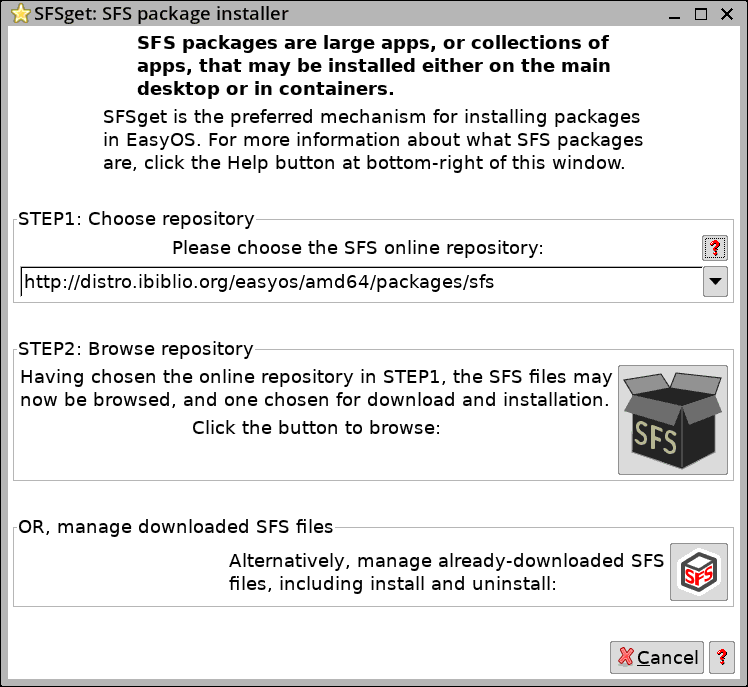
Clicking that bottom button will launch the BootManager:
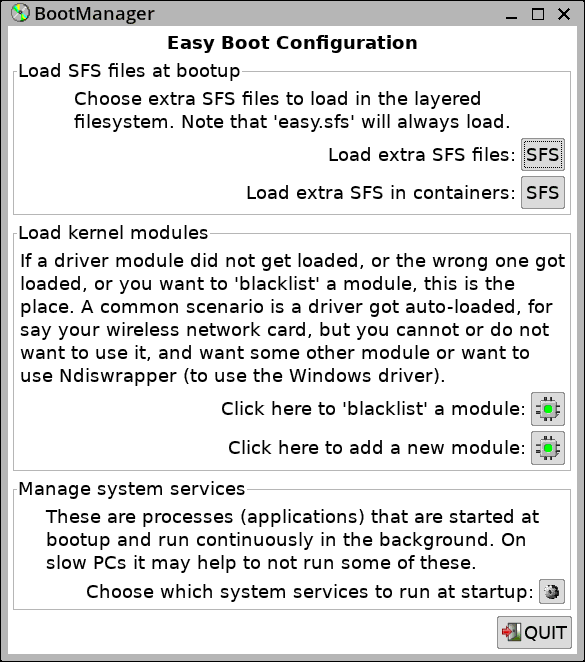
...which has "SFS" button to manage install and uninstall on main
filesystem and in containers.
Tags: easy
Seduced by the camera hype
I have two YouTube channels, this one a record of traveling in the south west of Western Australia:
https://www.youtube.com/@meanderinglight/videos
Also this one, an introspective journey:
https://www.youtube.com/@explore-sadhana/videos
...ok, that last one not everyone's cup of tea!
I started off by using my Moto G75 phone, held in a bracket, convertible to a tripod. Works OK, but jerkiness when panning, and a lot of waviness while walking. Got the idea that to fix these issues, need to have a gimbal camera; this is where I got seduced by the hype.
Yes, watched lots of YouTube videos, decided that needed a DJI Osmo Pocket gimbal camera. Bought the Pocket 3, not the latest (Pocket 4); this one:
https://www.jbhifi.com.au/products/dji-osmo-pocket-3-4k-3-axis-gimbal-camera-combo
...yes, AU$789!!!
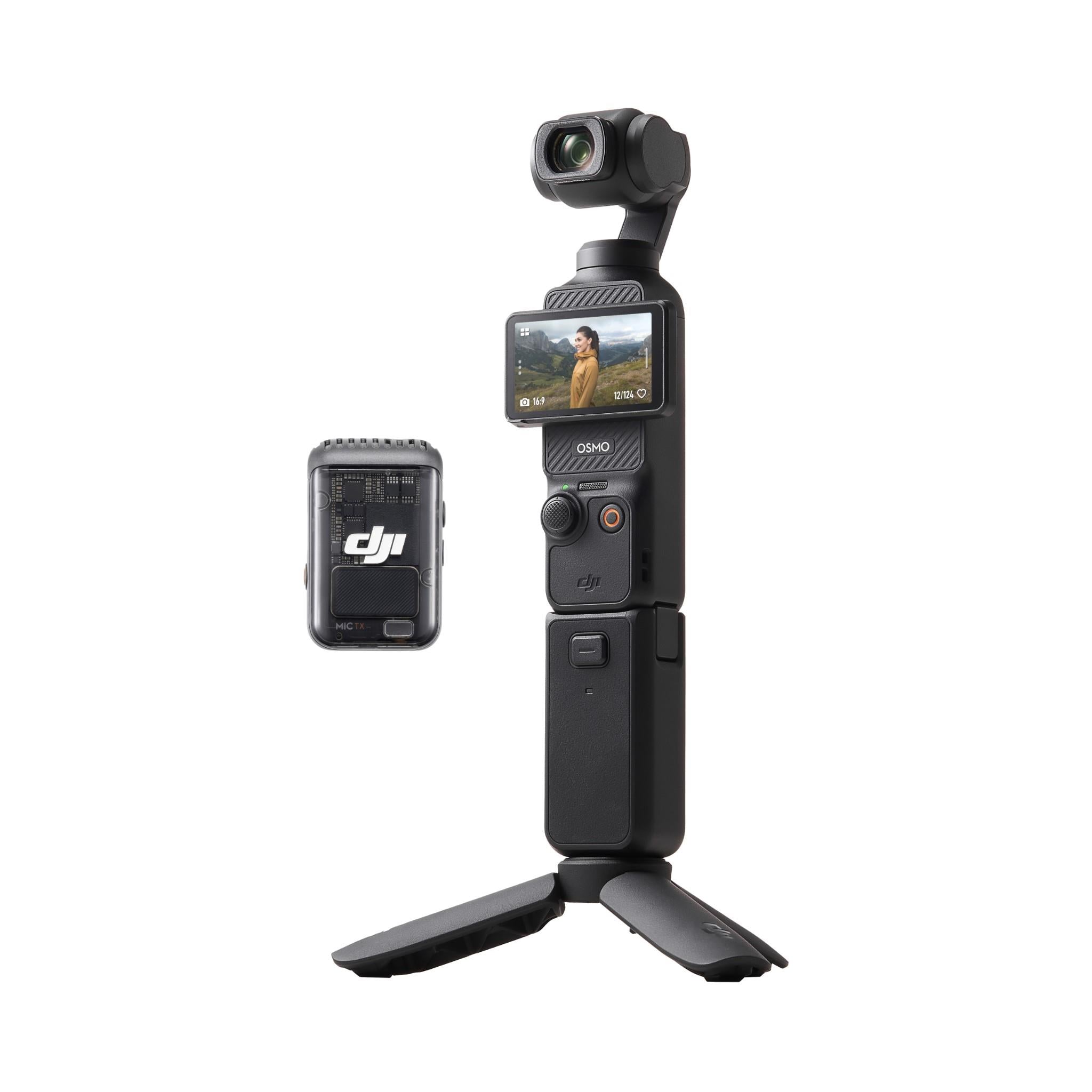
It's OK, still has waviness, up and down motion while walking,
that the 3-axis gimbal cannot fix. Apart from that, there is one
big problem; it is very delicate. Can't just stuff it in a trouser
pocket, nor throw into my carryon travel bag.
So, watched more YouTube videos, also viewed the excellent videos produced by other vloggers, such as Wayne:
https://www.youtube.com/@fiascodagama1
...he has a GoPro action camera.
I had previously shied away from action cameras, as they are fixed focus. I had fixated on the need for auto-focus, as my phone has. Fixed focus requires a fairly small lens aperture, so as to get sufficient depth of focus. Also, cannot get up close, needs a macro-lens for close-up focus. I also imagined that the small aperture meant poor low-light performance.
A point about auto-focus; while vlogging, the auto-focus can
sometimes be seen shifting what it is locked onto, which can be
disconcerting in the resultant video.
Then I saw an advert for a DJI Action 4 action camera, on sale for only AU$278. That is remarkably cheap, and watching YouTube videos convinced me that this is the one to have for vlogging. Here are some of those videos:
"Is The DJI Osmo Action 4 Still Worth Buying in 2025?"
https://www.youtube.com/watch?v=gPSnzjxpr2E
"DJI Action 4 Is The Most Underrated Camera In 2026!"
https://www.youtube.com/watch?v=mqS64_3DxYE
"DJI Osmo Action 4: Is It Still Worth Buying in 2026?"
https://www.youtube.com/watch?v=wo8kGySN6cA
"DJI Osmo Action 4: Is It Still Worth Buying?"
https://www.youtube.com/watch?v=rlicbMl1d3w
"Everyone Is Buying the Wrong Action Camera in 2026... Why I
Bought the DJI Osmo Action 4"
https://www.youtube.com/watch?v=NCnNu92qVUA
The Action 4 came out in 2023, and now superseded by the 5 and 6; at considerably higher prices. But I was convinced that for my vlogging needs, the 4 is excellent. So bought it, just before the sale-price ended:
https://www.harveynorman.com.au/dji-osmo-action-4-standard-combo.html

Also bought a stick/tripod thingy:
https://www.jbhifi.com.au/products/dji-osmo-action-mini-extension-rod-action-5-pro-action-4-action-3
I have been playing with it, amazed how good the videos are turning out. Also surprised how sharp images are up-close, less than a foot away.
Might sometimes still use the Pocket 3. Not a complete waste of
money though, as the external microphone (DJI Mic2) that came with
the Pocket 3 combo, pairs with the Action 4; that on its own is
sold for about AU$120.
Tags: nomad
Apple filesystem linux driver
Support for the Apple filesystem was added to EasyOS, see:
https://bkhome.org/news/202610/fix-support-apple-filesystems.html
However, a driver is also needed for the Linux kernel:
https://github.com/linux-apfs/linux-apfs-rw
...this will be the 'apfs.ko' module.
I have added this in woofQ2, so the driver will be in the next
kernel compile.
Tags: easy
The end of living in a tent
Well, have certainly "scratched that itch", been on the road for about 2 months, car and tent. Posted videos to YouTube:
https://www.youtube.com/@meanderinglight/videos
I have been closely watching others who are permanently on the road; they have camper-van/motor-home/caravan, certainly much better than a tent. But I'm not convinced they are all happy being constantly on the move. There is of course the underlying worry about a breakdown.
Might consider a van in the future, but for now, moving back to the city of Perth.
Rather like the idea of reducing belongings to just about nothing. Wayne is an example of that; he has a backpack with all of his possessions. He grew up in Perth and has a sister here, where he stays when back in Perth. His YouTube channel is "Fiasco da Gama":
https://www.youtube.com/@fiascodagama1/videos
Wayne was in Perth recently, for medical treatment, but has just
gone back to India. Chennai; I like his $10 per day hotel
room!
There is a catch for an Australian age pensioner to live overseas; more than 6 weeks, lose the Pensioner Concession Card. If permanently overseas, lose the Pension Supplement. That leaves a base pension, which is still pretty good in many Asian countries. Lots of Aussie seniors doing it.
Not that I will, just thinking of options.
Oh yeah, regarding those "MeanderingLight" videos; had the idea
of combining inner-contemplation-journey with an outer journey,
but decided that doesn't really work. So have deleted some of the
inner-contemplation videos.
Tags: nomad
EasyOS Excalibur-series version 7.4.92
This is a release-candidate for Easy 7.5, built with 7.2.10 kernel and excalibur-backports (trixie-backports) packages. Changes since 7.4.11:
- Kernel 7.2.10 compiled with hugepage support — October 14, 2026
- Kernel 7.2.10 compiled with legacy iptables support
- Broadcom-sta driver compiled for 7.2.10 kernel — October 13, 2026
- Linux kernel 7.2.10 compiled — October 13, 2026
- Another bug fix for Easy Installer — October 09, 2026
- Fix support Apple filesystems — October 09, 2026
- EasyOS version 7.4.90 maybe 7.5RC — September 20, 2026
- EasyOS with Excalibur-backports and 7.2.6 kernel — September 20, 2026
- Chromium 155.0.8059.39
- NVIDIA SFS version 615.78.08
Yes, this is now an official upgrade from Easy 7.4.11 and earlier. Or, if you previously installed Easy 7.4.90, you can update that if you wish.
Download:
https://distro.ibiblio.org/easyos/amd64/releases/excalibur/2026/7.4.92/
Feedback welcome at the forum:
https://forum.puppylinux.com/viewtopic.php?p=178212#p178212
Have fun!
Tags: easy
 rss
rss