
 site
site contact
 history
 index
indexEasyOS Excalibur-series version 7.4.10
Changes since 7.4.9:
- EasyOS 7.4.8 and 7.4.9 removed — September 18, 2026
- Precaution when insufficient space in working-partition — September 18, 2026
- Audacious rolled back — September 18, 2026
- EasyClone alternate build path and progress — September 17, 2026
- German users please stay with version 7.4.7 — September 17, 2026
- Fix reading Xlibre server version — September 16, 2026
- Chromium 153.0.8010.47
Download:
https://distro.ibiblio.org/easyos/amd64/releases/excalibur/2026/7.4.10/
Feedback welcome at the forum:
https://forum.puppylinux.com/viewtopic.php?p=176993#p176993
Have fun!
Tags: easy
EasyOS 7.4.8 and 7.4.9 removed
Decided to remove these from ibiblio.org, as too many issues. The latest version is now 7.4.7.
Doing this because thinking of newcomers.
I expect to upload version 7.4.10 soon.
Tags: easy
Precaution when insufficient space in working-partition
A couple of people have run into this problem, of having
insufficient free space in the working-partition. There are
various scenarios where this is a problem.
One of those is when do a version update; the latest 'vmlinuz', 'initrd' and 'easy.sfs' may push the free space below a reasonable value. One precaution that can be taken is to reduce the history-depth; that is, how many previous versions of Easy are kept. I have inserted this code into /inc/07-new-version script, at line 28:
 #20260917 check if enough space in working-partition...
 WPfreem=$(df -m /mnt/${WKG_DEV} | grep '^/dev/' | tr -s ' ' | cut -f 4 -d ' ')
 if [ $WPfreem -lt 3000 ];then #3GB
  if [ $DEPTH_MAX -gt 2 ];then
   DEPTH_MAX=$((${DEPTH_MAX}-1))
   echo -n "$DEPTH_MAX" > /mnt/${WKG_DEV}/${WKG_DIR}.session/session1/var/local/version-history-depth
  fi
 fi
That is one step, more checks can be done.
Tags: easy
Audacious rolled back
Having a bit of a saga with Audacious music player. Easy 7.4.7 has Audacious package from Easy Scarthgap. I have been gradually recompiling them in woofQ2, in Easy Excalibur; and that is the case for Audacious in Easy 7.4.8.
However, pp4mnk has discovered a plugin problem:
https://forum.puppylinux.com/viewtopic.php?p=176978#p176978
I have taken the easy way out, reverted to using the Audacious
packages from Scarthgap.
Tags: easy
EasyClone alternate build path and progress
EasyClone is introduced here:
https://easyos.org/install/how-to-clone-a-easyos-installation.html
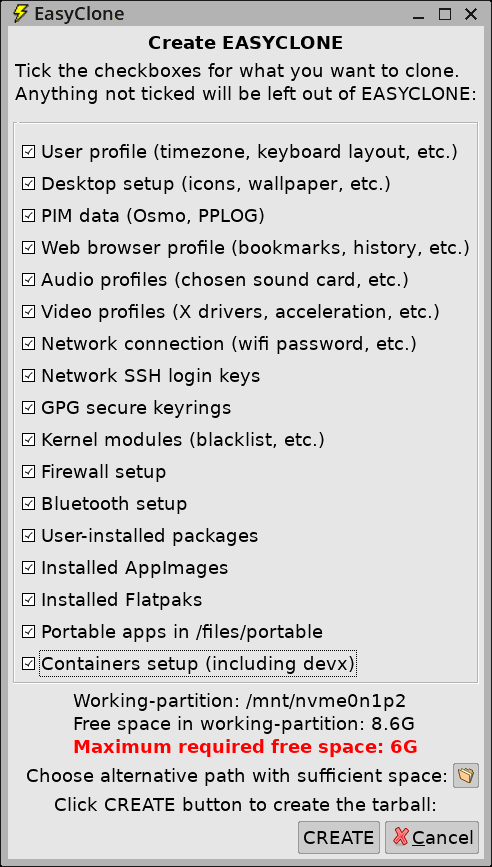
Forum member pp4mnk suggested it would be helpful to have a progress indication while the "EASYCLONE" file is being created. Forum member oliverjames wants an alternative path in which to build "EASYCLONE", if insufficient space in the working-partition. Discussion here:
https://forum.puppylinux.com/viewtopic.php?t=16721
I have implemented both. There is now a button to bring up a dialog window to choose an alternative path, see near bottom:
While creating EASYCLONE, there is a window on the desktop that has lines appended as the build progresses. Here it is at about 90%:
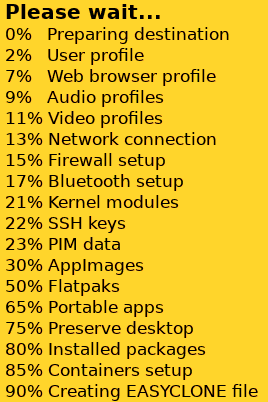
...this makes use of the 'popup' utility, which has the ability to append lines.
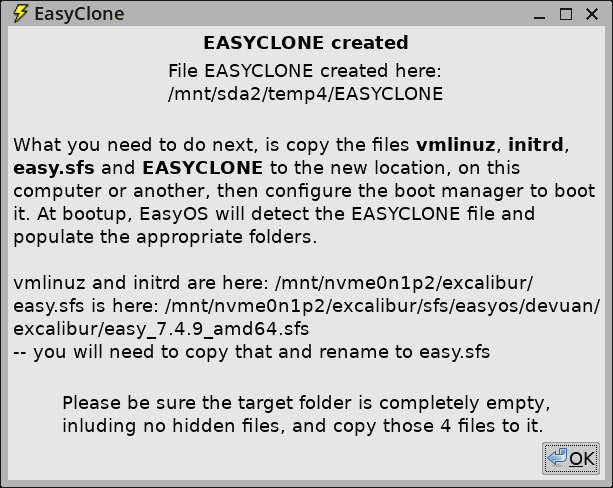
Here is the final window, showing the path, in a "temp4" folder where I chose to build EASYCLONE:
EasyClone is proving to be popular, this takes the usability up a
notch.
Tags: easy
German users please stay with version 7.4.7
There is a bad "de" translation that breaks the desktop:
https://forum.puppylinux.com/viewtopic.php?p=176948#p176948
Please wait for Easy 7.4.10
Tags: easy
Fix reading Xlibre server version
See forum:
https://forum.puppylinux.com/viewtopic.php?p=176902#p176902
A quick check, I have to fix more than just the xorgwizard:
# grep -rl 'Xorg -version' .
./usr/bin/inxi
./usr/sbin/xorgwizard-automatic
./usr/sbin/xorgwizard
./usr/local/video_upgrade/video_upgrade_wizard
Tags: easy
EasyOS Excalibur-series version 7.4.9 released
Oh wow, uploading took all day. I'm at a caravan park in rural Western Australia, that has free wifi. It is by StarLink, which is slower to upload than download. But this is incredible; started uploading the latest EasyOS, by sunset still only about halfway.
My phone contract is with Vodafone; however, Vodafone has poor coverage in rural regions. Whereas, Telstra has good rural coverage. I have a second phone with a Telstra sim, a prepaid sim, not a contract. Gave up on the wifi, did a 28-day recharge, 20GB, on the Telstra sim, AU$44, and finished the upload very fast. Telstra has 5G in this town.
Changes since 7.4.8:
- Audacious is back, more DE translations — September 16, 2026
- Fix system X cursor Chromium 151* — September 16, 2026
Download:
https://distro.ibiblio.org/easyos/amd64/releases/excalibur/2026/7.4.9/
Feedback welcome at the forum:
https://forum.puppylinux.com/viewtopic.php?p=176899#p176899
Have fun!
Tags: easy
 rss
rss