
 site
site contact
 news
newsSwitch to an older kernel
Right now I'm running EasyOS version 7.5 (still testing it, not
yet uploaded). I have already got
'linux-kernel_6.12.109_amd64.sfs', placed in
/mnt/wkg/sfs/easyos/devuan/excalibur; but once 7.5 is uploaded,
you will be able to run SFSget (via the desktop "pkg" icon) and
download to that location.
SFSget will also offer to install it, and it will only install to the main filesystem, not in a container. In my case, as it is already downloaded, I launched BootManager, via the menu "System -> BootManager configure bootup":
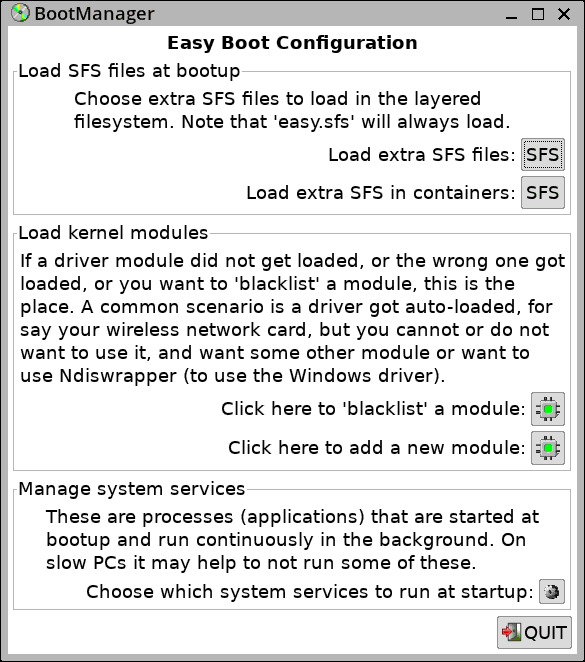
...clicked on the "Load extra SFS files:" button, then:
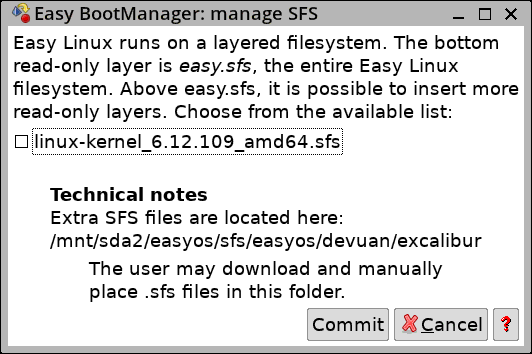
...ticked the checkbox, clicked "Commit", then rebooted.
Hey presto, EasyOS is now running the 6.12.109 kernel, complete with appropriate modules and firmware for that kernel.
Easy 7.5 has the 7.2.12 kernel, and to revert to it, just untick the checkbox in above image, and reboot.
The kernel switch mechanism was introduced in an earlier blog post:
https://bkhome.org/news/202610/select-alternative-kernel-version.html
It's so simple. Works great.
Tags: easy