
 site
site contact
 history
 index
indexEasyOS Excalibur-series version 7.5 released
Bumped from 7.4.92 which was announced here:
- EasyOS Excalibur-series version 7.4.92 — October 15, 2026
Here are the highlights since 7.4.92:
- Switch to an older kernel — October 28, 2026
- Kernel 7.2.12 compiled — October 27, 2026
- Checkbox share mounted partitions in container — October 27, 2026
- Ext234 patch for Limine v12 — October 26, 2026
- Select alternative kernel version — October 26, 2026
- Improvement for SFSget UI — October 26, 2026
- Apple filesystem linux driver — October 22, 2026
- Chromium 156.0.8078.47
Slight changes to the theme:

...the wallpaper is a photo taken at Four Mile Campground, on the south coast of Western Australia, near Hopetoun. Late afternoon, overcast.
Download:
https://distro.ibiblio.org/easyos/amd64/releases/excalibur/2026/7.5/
Found one bug so far:
The desktop icon theme is "treepata-darkgrey", but the "devx" icon is missing. There is a workaround; copy /usr/local/lib/X11/themes/treepata-yellow-blue/devx.sfs to the treepata-darkgrey folder.
Feedback welcome at the forum:
https://forum.puppylinux.com/viewtopic.php?t=17649
Have fun!
Tags: easy
DJI mic 2 versus mic mini 2
I posted about purchasing a DJI Osmo Pocket 3, then an Action 4:
https://bkhome.org/news/202610/seduced-by-the-camera-hype.html
In that post, commented that can use the external microphone from the Pocket 3 combo, with the Action 4. Hmmm, Google AI reports:
How Noise Cancellation Works on the DJI Mic 2
• Standalone or Receiver Mode:
You can toggle intelligent noise cancellation directly on
the transmitter by pressing the power button once (the status
indicator LED will turn yellow), or adjust it via the receiver.
• Bluetooth Limitation:
According to DJI Support, connecting the transmitter
straight to a smartphone via Bluetooth disables intelligent
noise-cancelling and internal recording.
• Workaround:
To use noise cancellation with a camera or phone, you
generally need to connect the DJI Mic 2 transmitter through its
dedicated receiver rather than a direct Bluetooth pairing.
...so, connecting the Mic 2 to the Action 4, via bluetooth, there is no noise cancelling!!!
But there is! Noise-cancelled audio is recorded internally in the Mic 2, and this audio file has to be downloaded to a computer via usb and merged with the video file. Which is what some people do. This video explains how:
https://www.youtube.com/watch?v=1kG4INpMam8
...what a lot of trouble, but many people do post-processing
anyway, so perhaps merging an audio file isn't a big deal. Not
something that I want to do. Notice in that video, he used the mic
2 receiver to program the mic 2 transmitter (microphone); however,
I think the the DJI Mimo phone app will do the same thing.
The mic mini 2, on the other hand, does support noise-canceled video recording transmitted via bluetooth directly to the Action 4. Apparently, have not yet verified. Anyway, DJI documentation confirms, as does Google:
Noise cancellation works on the DJI Mic Mini 2 when using a
direct Bluetooth connection, though you can toggle or control it
directly on the hardware.
What a run-around I'm having with this gear. Anyway, seem to now
have suitable vlogging gear for overseas travel.
Tags: nomad
Switch to an older kernel
Right now I'm running EasyOS version 7.5 (still testing it, not
yet uploaded). I have already got
'linux-kernel_6.12.109_amd64.sfs', placed in
/mnt/wkg/sfs/easyos/devuan/excalibur; but once 7.5 is uploaded,
you will be able to run SFSget (via the desktop "pkg" icon) and
download to that location.
SFSget will also offer to install it, and it will only install to the main filesystem, not in a container. In my case, as it is already downloaded, I launched BootManager, via the menu "System -> BootManager configure bootup":
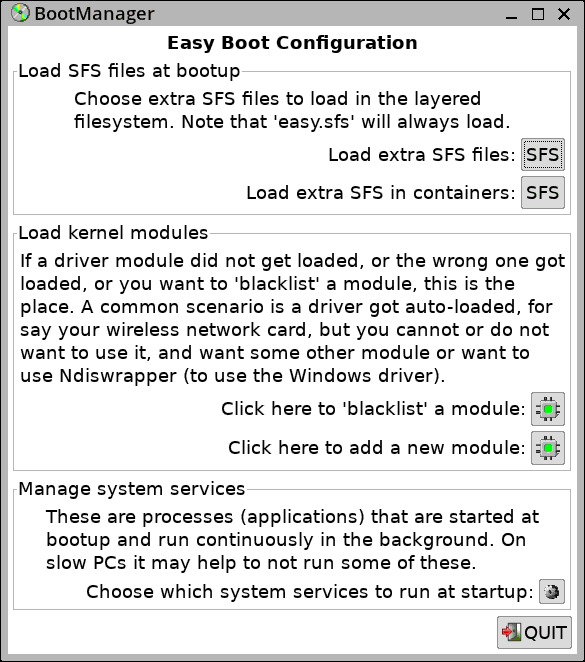
...clicked on the "Load extra SFS files:" button, then:
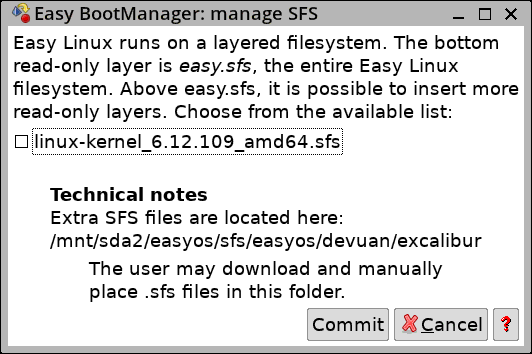
...ticked the checkbox, clicked "Commit", then rebooted.
Hey presto, EasyOS is now running the 6.12.109 kernel, complete with appropriate modules and firmware for that kernel.
Easy 7.5 has the 7.2.12 kernel, and to revert to it, just untick the checkbox in above image, and reboot.
The kernel switch mechanism was introduced in an earlier blog post:
https://bkhome.org/news/202610/select-alternative-kernel-version.html
It's so simple. Works great.
Tags: easy
Kernel 7.2.12 compiled
The main reason to bump the kernel version is it now compiles the apfs module:
https://bkhome.org/news/202610/apple-filesystem-linux-driver.html
This will be in the next release of EasyOS.
Tags: easy
Checkbox share mounted partitions in container
I posted about this feature in July 2025:
https://bkhome.org/news/202507/easy-containers-has-gone-to-the-next-level.html
The "devx" container has this variable set:
EC_ACCESS_MOUNTED='true'
Having a mounted partition accessible inside a container is very useful, but what was missing is a GUI checkbox to set it for any other container. That checkbox has now been added:

The help window:

I have ShotCut video editor installed in the "x3" container, running as "crippled root". From inside the container, I want the convenience of reading and writing files in a outside partition, not just in /files
You can still do it manually, for example, open
/mnt/wkg/containers/x3/configuration and edit EC_ACCESS_MOUNTED='true',
or insert that line if it doesn't exist.
Tags: easy
Ext234 patch for Limine v12
EasyOS is currently using Limine v11, as the ext2/3/4 patch doesn't work with v12.
Forum member zepto has investigated and created a patch to fix v12:
https://forum.puppylinux.com/viewtopic.php?t=17629
That's really great. I hope to compile Limine v12 for the next
release of EasyOS.
Tags: easy
Select alternative kernel version
EasyOS is now being built with the 7.2.x kernel; however, some
people might prefer an older kernel. There is now a mechanism to
switch kernels.
I have created 'linux-kernel_6.12.109_amd64.sfs', that SFSget will be able to download and install. It will install to the main filesystem only, not in a container. After install, reboot, and the 6.12.109 kernel will be automatically used. Ditto, in the BootManager, untick it (uninstall) and at next bootup there will be an automatic revert to the default kernel.
There is a new script in the initrd, /inc/05kernel-change:
#!/bin/sh
#if a "linux-kernel" sfs is to be loaded, switch to use its kernel.

#find vmlinuz have booted from...
#if BOOT_* passed on kernel cmdline and vmlinuz there...
if [ -n "$BOOT_DEV" ];then
 mkdir -p /mnt/${BOOT_DEV}
 if [ ! -f /mnt/${BOOT_DEV}/${BOOT_DIR}vmlinuz ];then
  mount -t ${BOOT_FS} /dev/${BOOT_DEV} /mnt/${BOOT_DEV}
 fi
 VM_DEV="${BOOT_DEV}"; VM_DIR="${BOOT_DIR}"
else
 VM_DEV="${WKG_DEV}"; VM_DIR="${WKG_DIR}"
fi
if [ ! -f /mnt/${VM_DEV}/${VM_DIR}vmlinuz ];then
 err_exit_func "${Lm}${LINENO} Failed to find vmlinuz"
fi

#find linux-kernel sfs...
LK="$(grep '^EASY_LAYER_RO.*linux-kernel' /mnt/${WKG_DEV}/${WKG_DIR}releases/easy-${INIT_DISTRO_VERSION}/configuration)"

KV2="$(uname -r)"
if [ -z "$LK" ];then
 #make sure boot default kernel...
 KV1="$(strings /mnt/${WKG_DEV}/${WKG_DIR}releases/easy-${INIT_DISTRO_VERSION}/vmlinuz | grep -E '^[0-9]+\.[0-9]+\.[0-9]+' | cut -f 1 -d ' ')"
 if [ "${KV1}" != "${KV2}" ];then
  #restore default kernel...
  cp -f /mnt/${WKG_DEV}/${WKG_DIR}releases/easy-${INIT_DISTRO_VERSION}/vmlinuz /mnt/${VM_DEV}/${VM_DIR}
  sync
  #reboot...
  echo -e "\\033[1;31m ${S560:-Kernel version change:} ${KV2} ${KV1}\\033[0;39m" #red.
  echo -e "\\033[1;31m ${S503:-Counting down to restart...}\\033[0;39m" #red.
  KPARAMS="$(cat /proc/cmdline)"
  countdown_func 10
  /bin/kexec --load /mnt/${VM_DEV}/${VM_DIR}vmlinuz --initrd=/mnt/${VM_DEV}/${VM_DIR}initrd --command-line="${KPARAMS}"
  /bin/kexec -e
 fi
else
 #read the kernel version in sfs...
 #full readlink...
 #note, if broken link, later code will delete it...
 readlink -q -e /mnt/${WKG_DEV}/${WKG_DIR}releases/easy-${INIT_DISTRO_VERSION}/linux-kernel.sfs
 if [ $? -eq 0 ];then
  K3="$(readlink -e /mnt/${WKG_DEV}/${WKG_DIR}releases/easy-${INIT_DISTRO_VERSION}/linux-kernel.sfs)"
  KV3="$(echo -n "${K3}" | -cut -f 2 -d '_')"
  if [ "${KV2}" != "${KV3}" ];then
   #extract vmlinuz out of the sfs...
   mkdir -p /mnt/sfs
   mount -t squashfs ${K3} /mnt/sfs
   cp -f /mnt/sfs/boot/vmlinuz /mnt/${VM_DEV}/${VM_DIR}
   sync
   umount /mnt/sfs
   #reboot...
   echo -e "\\033[1;31m ${S560:-Kernel version change:} ${KV2} ${KV3}\\033[0;39m" #red.
   echo -e "\\033[1;31m ${S503:-Counting down to restart...}\\033[0;39m" #red.
   KPARAMS="$(cat /proc/cmdline)"
   countdown_func 10
   /bin/kexec --load /mnt/${VM_DEV}/${VM_DIR}vmlinuz --initrd=/mnt/${VM_DEV}/${VM_DIR}initrd --command-line="${KPARAMS}"
   /bin/kexec -e
  fi
 fi
fi
The logic seems OK, yet to be tested.
Tags: easy
Improvement for SFSget UI
SFSget is the SFS (squashfs files) manager, launched via the desktop "pkg" icon, or in the "Setup" category of the menu.
It is not intuitive when want to manage already-downloaded SFS files, say one that you have used SFSget to install, but then you want to uninstall it. Install and uninstall can be managed via the BootManager (in the "System" category on the menu). This split-up does make SFS management a bit un-intuitive.
To help link them, I have added a frame at the bottom of the first window that SFSget displays:
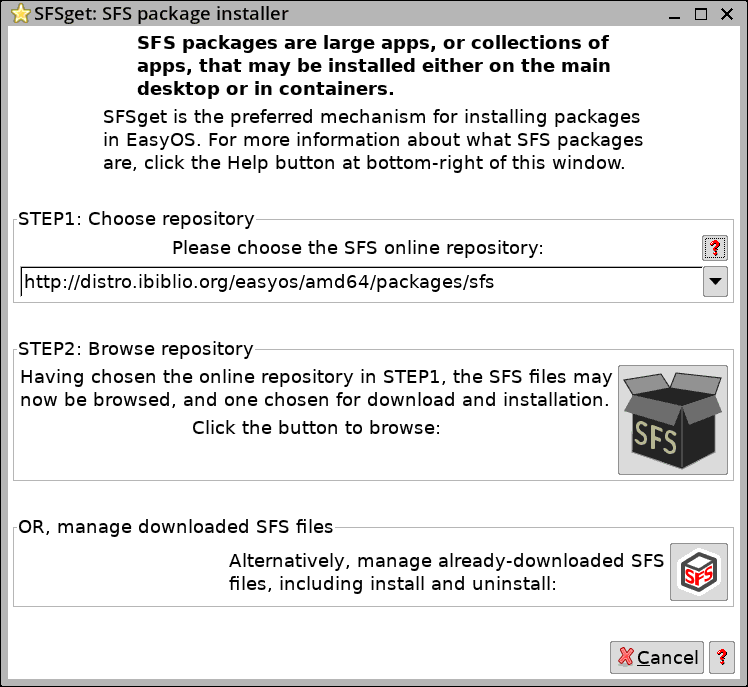
Clicking that bottom button will launch the BootManager:
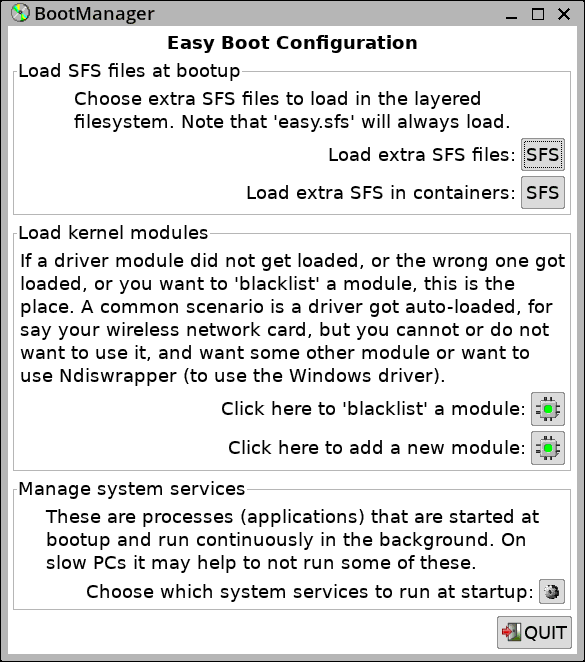
...which has "SFS" button to manage install and uninstall on main
filesystem and in containers.
Tags: easy
 rss
rss