
 site
site contact
 news
newsDropout to shell in initrd
The shutdown menu, when running the desktop, has an option to reboot and dropout from the 'init' script in the initrd, for debugging the initrd. However, what if you can't get to the desktop, what if the problem, like a crash, is in the initrd?
It is possible to add a "dropout=<number>" parameter on the kernel commandline, but I had also implemented a menu entry in the initrd, to dropout ...or rather, I thought that I had.
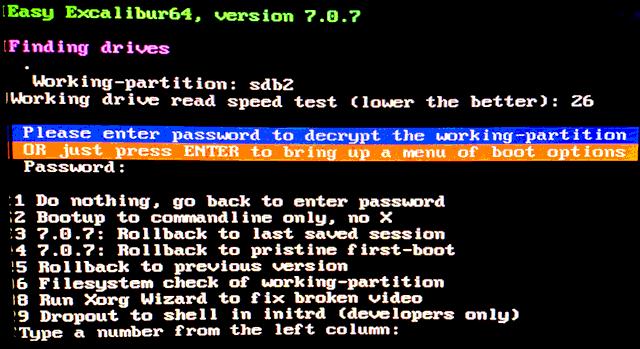
I was in that situation a few days ago, wanted to debug the initrd, and was surprised that there is no dropout item in the initrd menu. Then I remembered; I had implemented it in QV, my other experimental Linux distribution, not in EasyOS. So, have ported it across to EasyOS. Now, at bootup, there is this early menu in the initrd, with new item-9:
Choosing item-9, there is a sub-menu:
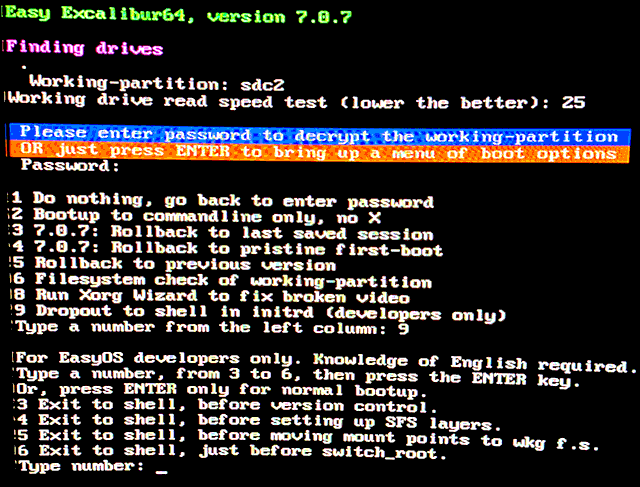
Those dropout points are in the 'init' script. At the shell, you
can run the mp text editor, which has a very nice text-mode GUI,
if you want to study the init script. Then hopefully run tests and
determine what the problem is.
Not that there are any problems right now; Easy 7.0.7 is running
nicely (not yet uploaded).
Tags: easy