
 site
site contact
 news
newsBorder line-characters in text-mode dialog utility
Forum member szept reminded me of this problem. Running 'xorgwizard' from a terminal, X not running, the text-mode dialog boxes are supposed to have line-characters to draw the borders, but instead have weird characters. See the photos here:
https://forum.puppylinux.com/viewtopic.php?p=168389#p168389
Yes, you can see this for yourself, go to the menu "Shutdown --> Rectify --> Exit to commandline" then run this:
# dialog --msgbox "this is a message using the text-mode dialog utility" 0 0
This is what it is supposed to look like:
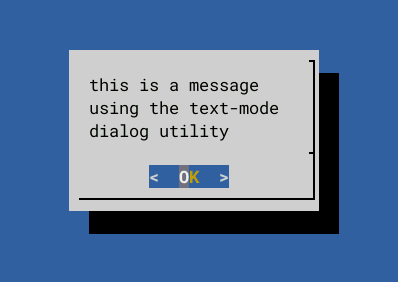
...and yes, you will get those correct border lines if do it in a
terminal window when Xorg is running.
If you check the TERM variable:
# echo $TERM
xterm
Changing TERM to "linux" does fix the border lines. I don't recall why I chose TERM=xterm, or maybe I didn't, maybe that is Devuan's default? Don't recall, too long ago. Ah, just remembered, TERM is set in file /etc/profile:
TERM="xterm"
I will leave it at "xterm", because there is another fix. Created /etc/profile.d/ncurses, with this content:
export NCURSES_NO_UTF8_ACS=1
There is information online about "NCURSES_NO_UTF8_ACS", for example:
https://stackoverflow.com/questions/12089306/strange-extended-characters-in-ncurses
https://invisible-island.net/ncurses/man/ncurses.3x.html#h3-NCURSES_NO_UTF8_ACS
I asked Google AI "what are acs characters in a linux terminal":
ACS (Alternate Character Set) characters in the Linux terminal
are a specialized set of graphical symbols used to draw lines,
boxes, and other interface elements (like diamonds or
checkerboards) in text-based applications. They are derived from
the VT100 terminal standard and allow tools like top, vim, nano,
and iftop to create a graphical user interface (GUI) appearance
within a terminal emulator.
Super User
Super User
Key Aspects of ACS
Purpose: To draw boxes and lines (┌, ─, ┐, └, ┘, │) that form
menus, panels, and borders.
Mechanism: When an application (like ncurses) wants to draw a
box, it sends an escape sequence to the terminal to switch from
normal ASCII text mode to the "alternate character set" mode. In
this mode, standard keyboard characters (like q, x, l, k) are
rendered as graphics (like lines or corners).
Terminfo (acsc): The capability of a terminal to support these
characters is defined in its terminfo entry, often denoted by
the acsc string.
ACS vs. Unicode: While modern terminals often use UTF-8
box-drawing characters, ACS is a legacy technology that predates
wide UTF-8 adoption, enabling line-drawing on older or
restricted terminal emulators.
Whatever, setting NCURSES_NO_UTF8_ACS=1 works.
I asked Google AI "what is the term variable set to in most linux distributions":
In most Linux distributions, the $TERM environment variable is
automatically set to xterm-256color in modern terminal emulators
(like GNOME Terminal, Konsole, or Terminal.app).
However, the value can change based on how you are logged in:
🖥️ Inside a Terminal Emulator (GUI): xterm-256color (Default
for modern GNOME, Ubuntu, Arch)
💻 Physical/Virtual Console (tty1-6): linux
📡 Remote Session (SSH): Inherits from the local machine
(usually xterm-256color or xterm)
⚠️ Older Systems/Basic Emulators: xterm or vt100
As I recall, TERM=xterm supports only 16 colours. I am happy with
that.
EDIT:
I recall, years ago, getting these line-characters right was
complicated. Testing now, problems with 'mp' console text
editor. Here is a table of what works, first in a terminal when
X running:
| TERM |
NCURSES_NO_UTF8_ACS |
|
| dialog |
xterm or linux |
set or unset |
| mp |
xterm |
unset |
Now exit from X:
| TERM |
NCURSES_NO_UTF8_ACS |
|
| dialog |
xterm |
set |
| dialog |
linux |
unset |
| mp |
linux |
unset Also
need LANG=C |
I'm still figuring out how to handle this.
EDIT:
'mp' is very old code, not UTF8-aware. So treating it as a
special case. It is in PET package 'mped', that I have modified,
changed the executable 'mp' to 'mp.real' and created a 'mp'
script:
#!/bin/ash
export LANG=C
export TERM=linux
exec mp.real $@
...and doesn't matter whether
NCURSES_NO_UTF8_ACS set or unset. Now, looks like dialog and mp
borders will draw properly when X running or not.
Tags: easy