
 site
site contact
 news
newsImproved dvd movie navigation in mpv
I posted in the forum that intend to throw out SMPlayer and only keep mpv and DVDplay. The only reservation I had with mpv is that is doesn't properly recognise the segments of the dvd and immediately plays the main feature, skipping the introductory section.
Forum member ozsouth discovered a solution:
https://forum.puppylinux.com/viewtopic.php?p=172516#p172516
Yes, some lua scripts, but it was unclear where to place them. I found that they needed to be here:
/root/.config/mpv/script-modules/dvd-browser.lua
/root/.config/mpv/script-modules/scroll-list.lua
/root/.config/mpv/script-modules/dvd_browser.conf
They need to be activated when play a dvd, so /usr/bin/mpvshell has this:
#!/bin/sh

#turn off screensaver...
TURNONAFTER=0
if [ -e /root/.xset.sh ];then
 if [ "$(grep "^xset .* s off" /root/.xset.sh)" = "" ];then
  xset s off -dpms
  TURNONAFTER=1
 fi
else
 xset s off -dpms
 TURNONAFTER=1
fi

#20260619 have scripts in /root/.config/mpv/script-modules, for dvd playing...
# ref: https://github.com/CogentRedTester/mpv-dvd-browser
echo -n "$@" | grep -qF 'dvd://'
if [ $? -eq 0 ];then
 mpv --script=~~/script-modules/dvd-browser.lua dvd:// ###RUN IT###
else
 mpv --player-operation-mode=pseudo-gui "$@" ###RUN IT###
fi

[ $TURNONAFTER -eq 1 ] && xset s on
...that "~~" actually means path /root/.config/mpv
The script /usr/local/bin/defaultmediaplayer will have:
#!/bin/sh
exec mpvshell "$@"
Just click on the dvd icon on the desktop will cause "defaultmediaplayer dvd://" to run (see /usr/local/bin/drive_all), which will run mpvshell.
Snapshot:
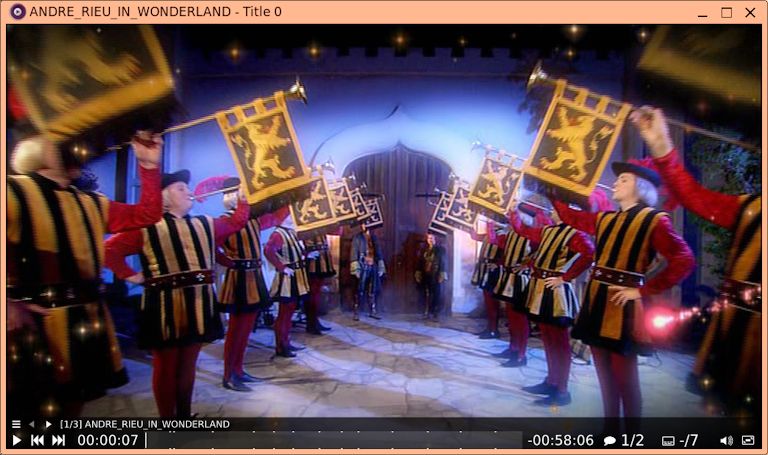
...the lua scripts have added enhanced information in the menu,
and the left and right arrow keys; you can see the "[1/3]" and a
title for the first segment. The second segment is the main
feature, the third is an epilogue.
Tags: easy