
 site
site contact
 news
newsOpenShot video editor issues
As I am now creating videos for YouTube, need to learn how to use a video editor. YouTube has an online editor, that allows some very limited operations on a video after it has been uploaded. For example, can cut out sections. It is not allowed to edit the uploaded video offline then re-upload.
The first major problem with OpenShot is that videos I am recording on my Zenbook laptop are 1728x1080 pixels. Searching online, there are instructions that there is a button to set a custom video resolution; however, it doesn't exist. Maybe that was in an earlier version of OpenShot?
Eventually, found that had to create a file in the home folder. In my case, as running OpenShot as user "openshot", the path to the file is /home/openshot/.openshot_qt/profiles and I named the file 'custom_1728x1080' with this content:
description=Custom 1728x1080
frame_rate_num=24
frame_rate_den=1
width=1728
height=1080
progressive=1
sample_aspect_num=1
sample_aspect_den=1
display_aspect_num=1
display_aspect_den=1
colorspace=709
It then showed up in the list of resolutions in OpenShot.
I have had a brief look at ShotCut, and I would like to comment that ShotCut has a big tick, as has a simple setting, to set the project to same resolution as the imported video.
Then, the next issue is that the video is distorted in the preview window:
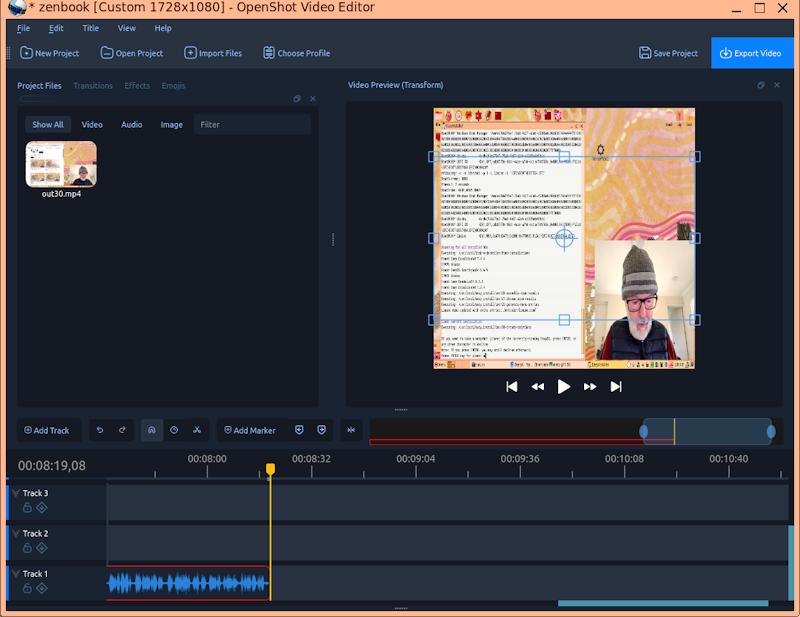
But, worse to come, when exported, just got a black window with audio only. My video has stock-standard h264 video and aac audio, so that shouldn't be a problem. After some online searching, found advice to update to a later version. I was using the OpenShot package from the Debian repository, version 3.1.1.
So, downloaded the latest AppImage, version 3.5.1, and now exports video and audio OK. Also, correct video resolution, despite the distortion in the preview window.
I have updated Appi, the AppImage package manager in EasyOS, to OpenShot 3.5.1.
If you want to read more about OpenShot:
So, what do I reckon about OpenShot. Chose it because Google AI
stated that it is the easiest to use. Yes, the user interface is
nice. However, have played with ShotCut briefly, well, only 10-15
minutes, and have the impression it is a step-up from OpenShot.
next up, going to have a good look at ShotCut.
Tags: easy