
 site
site contact
 news
newsXdialog displays date incorrectly
If you click on the clock icon in the tray, there is a menu, one entry being "Set date and time". This ends up running /usr/sbin/set-time-for-puppy, which runs this:
# Xdialog --stdout --title "$TITLE" --calendar "$(gettext 'Please set the date...')" 0 0 0 0 0
However, as was reported to me recently, the date is displayed incorrectly. Today is Wednesday 29th July:
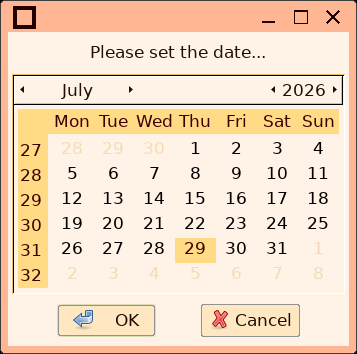
Xdialog is a gtk2 application, it relies upon getting locale and date information via gtk2.
Xdialog calendar has worked for us for "forever", right back from the early Puppy days. So, what has gone wrong?I tested in Easy Scarthgap, calendar is OK. used the Scarthgap Xdialog utility in Excalibur, get the wrong date. This is looking suspiciously like something wrong with gtk2. Unfortunately, that means gtk2-ng. WoofQ2 has a configuration file, woofq2/configure/x86_64/build-choices (/root/.packages/build-choices in a runnging EasyOS), with these lines:
#20260602 yes or anything else for no...
BUILD_X_XLIBRE='no'
#20260608
BUILD_GTK2_NG='yes'
...I had already abandoned Xlibre, as it causes the Xorg nouveau
driver to crash Xorg, reported awhile back but still not fixed.
All that they have done is deprecate the nouveau driver, to use
modesetting drive instead.
Now it is looking like will have to abandon gtk2-ng also. Yes, I
also checked an EasyOS Excalibur version before using gtk2-ng, and
the Xdialog calendar is OK.
Tags: easy