
 site
site contact
 news
newsEasy Installer first test
I posted about a new graphical installer:
https://bkhome.org/news/202607/started-work-on-easyos-graphical-installer.html
A lot of work since then. Really "went down a rabbit hole"; many nights "burning the midnight oil".
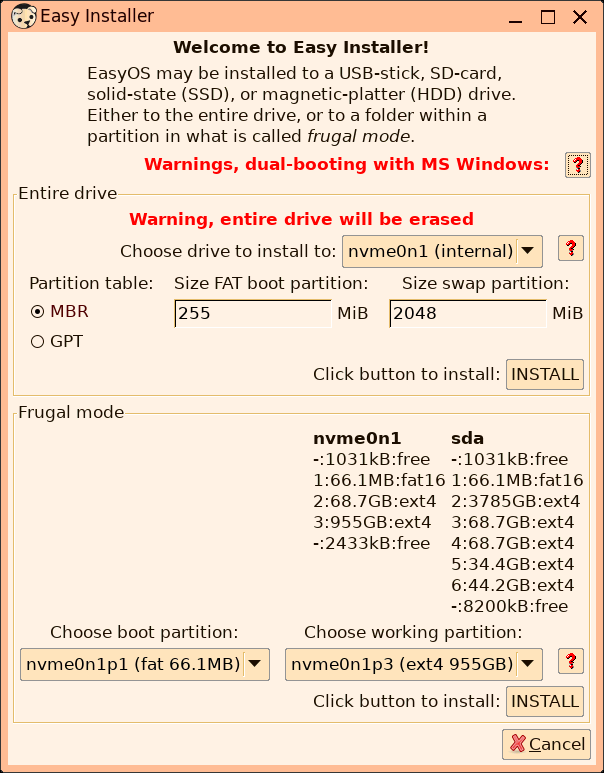
Here is the latest snapshot of the main window:
A video has been created:
"EasyOS Part21: Graphical installer"
https://www.youtube.com/watch?v=cfYoNK8XYGY
More testing required before can release it.
Tags: easy
ethtool utility missing
See here:
https://forum.puppylinux.com/viewtopic.php?p=174022#p174022
Now added builtin.
Tags: easy
Handle mailto mime in xdg-open
In response to question about /usr/sbin/mailto.sh in Easy:
https://forum.puppylinux.com/viewtopic.php?p=174000#p174000
I cannot recall how mailto.sh was used, anyway have removed it.
/usr/bin/xdg-open has handling for an email address.
An application can call xdg-open, passing an email address, and it
is then supposed to open in the appropriate email client app.
The line that does this in xdg-open:
 *@*.*)
  exec rox -U "mailto:${1}"
 ;;
...which does nothing.
I have created /etc/xdg/rox.sourceforge.net/URI/mailto:
#!/bin/sh
#20260718

if type -p mozmail >/dev/null;then
 exec mozmail -compose "to='${1}'"
elif type -p claws-mail >/dev/null;then
 exec claws-mail --compose "$1"
elif type -p claws >/dev/null;then
 exec claws --compose "$1"
elif type -p sylpheed >/dev/null;then
 exec sylpheed --compose "$1"
fi
I'm not 100% sure about this mechanism, but it is a step in the
right direction.
Tags: easy
Fix round brackets in URI
A URI to a local video file, for the chromium-based VIDplay media player, aborted as the filename had round brackets:
https://forum.puppylinux.com/viewtopic.php?p=173964#p173964
The fix has been applied to /usr/sbin/vidplay in
woofQ2.
Tags: easy
Fix sudo run as another user
EasyOS does not have 'sudo', instead has a light-weight replacement named 'sudo-sh':
https://bkhome.org/news/202510/sudo-sh-reverted-to-simpler-design.html
There is a script /usr/bin/sudo, that is a wrapper for sudo-sh. It is far from implementing everything that sudo is capable of. The guys found when install Zoneminder, that it tries to use sudo to launch an app as user 'www-data':
https://forum.puppylinux.com/viewtopic.php?p=173863#p173863
I have modified 'sudo' script:
#!/bin/ash
C=''
while [ -n "$1" ];do
 case "$1" in
  -*)
   case "$1" in
    --user=*)
     #ref: https://forum.puppylinux.com/viewtopic.php?p=173863#p173863
     USERx="${1/*=/}"
     shift
     exec /usr/sbin/run-as-user ${USERx} ${@}
    ;;
    -u)
     shift
     exec /usr/sbin/run-as-user ${@}
    ;;
    -g|-p|-U|-C|-r|-t)
     shift
    ;;
   esac
  ;;
  *)
   C="$@"
   break
  ;;
 esac
 shift
done

if [ -n "$C" ];then
 #exec sudo-sh ${PPID} ${0} ${C}
 exec sudo-sh ${PPID} ${C}
fi
###end###
The 'run-as-user' script was introduced here:
https://bkhome.org/news/202602/enhanced-script-to-run-app-as-any-user.html
If you try and run it, like this for example: run-as-user www-data myapp
It will fail, as folder "/home/www-data" does not exist. I have
modified the 'run-as-user' script to call
/usr/local/clients/create-client-environment if www-data not in
/etc/passwd, or if it is, to not require existence of
/home/www-data.
Tags: easy
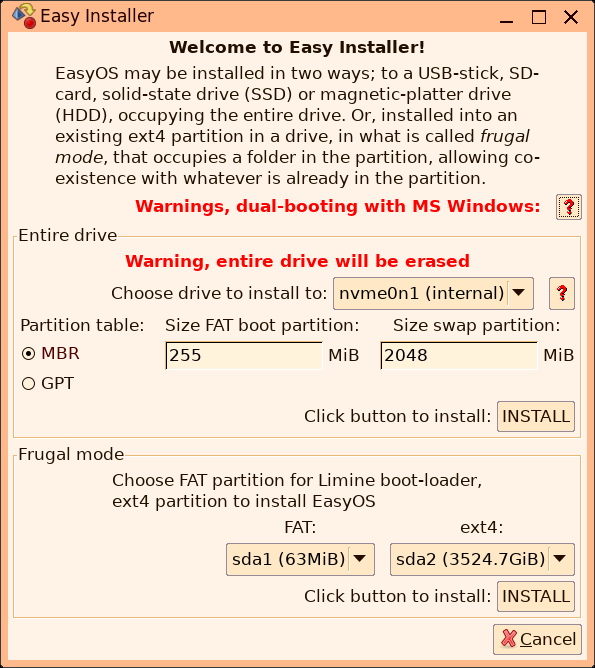
Started work on EasyOS graphical installer
Still a lot to do, but here are some snapshots. The startup window:
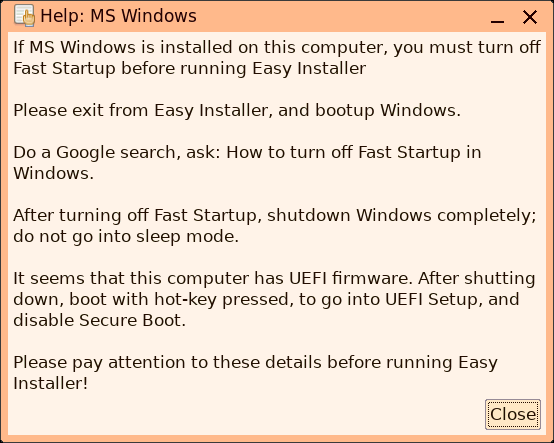
MS Windows help popup:
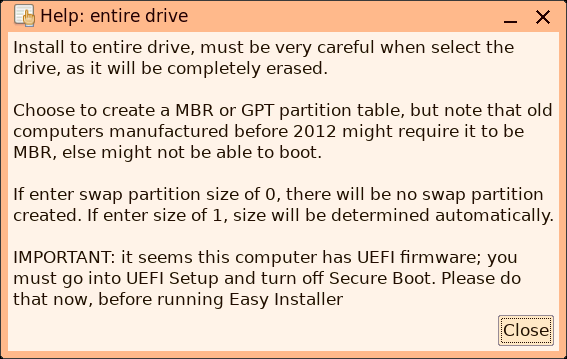
Install to entire drive help:
For frugal install, the Installer cannot do everything. Just like the mainstream installers, such as Calamares, some things have to be done in a running MS Windows. Especially these days, as it seems most Windows installations in modern computers have encrypted drives, using BitLocker.
So, I will need to revise and improve the instructions for
defragmenting and shrinking the main C: partition, and turn off
Fast Startup. After that, there will be free space in the drive,
and gParted can be used to make a ext4 partition, and maybe
another FAT partition. Though, Easy Installer could also be coded
to do this.
Tags: easy
Set Limine default in UEFI
Reviewing Limine Installer, this code adds the new installation of Limine to the UEFI (/usr/local/limine-installer/limine-installer, line 572+:
    DRVdest="$(echo -n "${ESPdest}" | sed -e 's%[0-9]*$%%' -e 's%p$%%')" #ex: sdb
    efibootmgr -c -d /dev/${DRVdest} -p ${ESPdest/*[a-z]/} -L limine -l "\EFI\limine/"${EFIname}".EFI" 2>/tmp/limine-installer/efibootmgr-install-error.log
...where "-c" is the short form of "--create", "-d" is the drive,
"-p" is partitition number, "-L" is the label, and "-l" is path
the to Limine .efi file.
According to online documentation, this new entry should become the default at next bootup. However, I seem to recall, from testing sometime ago, that might not have been the case, so have added extra code to ensure it is first in the boot order:
     ENTRY="$(efibootmgr 2>/dev/null | grep ' limine' | grep -o '000[0-9A-Z]')"
     BO1="$(efibootmgr 2>/dev/null | grep '^BootOrder:' | cut -f 2 -d ' ' | tr ',' '\n' | grep -v "${ENTRY}")"
     BO2="${ENTRY}${CR}${BO1}"
     BO3="$(echo -n "${BO2}" | tr '\n' ',')" #ex: 0005,0000,0001
     efibootmgr --bootorder ${BO3}
I have started to think about a graphical installer for EasyOS,
and Limine Installer will be part of it. So, checking the code in
Limine Installer, that it looks sane.
Tags: easy
EasyOS Excalibur-series version 7.4.4 released
Bug fixes! Release notes since 7.4.3:
- Another fix to unmount all partitions — July 11, 2026
- Typo in EasyShare — July 11, 2026
- yff rolled back to 2.7 — July 11, 2026
- Fix flipout container not work — July 11, 2026
- YouTube Part-20 multi-window file manager — July 10, 2026
- Remove old configuration files — July 10, 2026
- Video Part-19 easy install to PC — July 09, 2026
...and of course, more videos.
If you are a newcomer to EasyOS, recommend read the 7.4 announcement, as it has more details:
- EasyOS Excalibur-series version 7.4 released — June 15, 2026
Download:
https://distro.ibiblio.org/easyos/amd64/releases/excalibur/2026/7.4.4/
Feedback welcome on the forum:
https://forum.puppylinux.com/viewtopic.php?p=173649#p173649
Have fun!
Tags: easy